
How to Set Up Alerts That Don't Create Noise
The Two Questions Every Alert Must Answer
Before you set any alert, it should pass two tests:
1. Would I change my behavior if I saw this?
If the answer is "interesting, but I wouldn't do anything different," don't set the alert. Alerts exist to trigger action — a new outreach angle, a re-engagement, an escalation, a competitive response. If the alert doesn't change what you do next, it's trivia, not intelligence.
2. Is the timing of knowing this important?
Some events matter because they're time-sensitive — a leadership change creates a 2-week window before the new exec settles in. Others are contextually useful but not urgent — a company's annual report gives you talking points, but whether you read it Tuesday or Friday doesn't change the outcome.
Alerts are for the first category. The second category belongs in research — surfaced when you look, not pushed when it happens.
What Makes a Good Alert vs. a Bad One
Good alerts create selling opportunities
A good alert tells you something changed that opens a door. It's specific enough to act on, timely enough to matter, and relevant to how you sell.
Characteristics of good alerts:
- Tied to a specific selling motion (not general curiosity)
- Time-sensitive (there's a window to act)
- Actionable (you know what to do when you see it)
- Rare enough that each one feels significant
Bad alerts create reading obligations
A bad alert tells you something happened, but doesn't connect it to action. It fires frequently, requires interpretation, and trains you to ignore notifications.
Characteristics of bad alerts:
- Broad topic monitoring ("any news about Company X")
- High-frequency events that don't individually matter (minor press mentions, social posts)
- Information you'd find in normal research (quarterly results you'd check anyway)
- Events that don't map to your selling motion
Examples of the difference
Good alert → Bad alert:
- New CTO appointed at target account → Any leadership mention at target account
- Company announces platform consolidation initiative → Company mentioned in an industry article
- Competitor contract coming up for renewal → Competitor mentioned anywhere
- Company posts 5+ data engineering roles in 2 weeks → Any job posting at company
- CFO quotes cost reduction as priority on earnings call → Company reports quarterly earnings
- Company announces data breach or compliance issue → Company mentioned in security news
The pattern: good alerts are specific events that create selling opportunities. Bad alerts are broad topics that create reading obligations.
Setting Cadence by Signal Type
Not all events move at the same speed. A leadership change happens suddenly and creates a short window. A quarterly earnings call happens on a published schedule. Your alert cadence should match the velocity of the signal.
Real-Time Monitoring (Daily Cadence)
These events happen unpredictably and create short windows where acting fast matters. Monitor daily.
Leadership and personnel changes:
- C-level departures and appointments
- VP/Director-level moves in your buying committee
- Board changes at strategic accounts
- Your champion leaving the company
Why daily: The first 2–3 weeks after a leadership change are the most receptive window. A new exec is building their agenda, evaluating vendors, and open to conversations they wouldn't take later. If you find out a month after, the window is closed.
Competitive displacement signals:
- Contract expirations with known competitors
- Public complaints about current vendor (on review sites, social, forums)
- Competitor outages, security incidents, or pricing changes
- RFP announcements in your category
Why daily: Competitive windows are short. When a company publicly signals dissatisfaction with a vendor or starts an evaluation, the first sellers in the conversation shape the criteria. A week late is often too late.
Breaking strategic shifts:
- Acquisition announcements
- Major partnership announcements
- Emergency board decisions
- Sudden layoffs or restructuring
Why daily: These events create immediate internal chaos and priority shifts. Reaching out within days — with a relevant point of view — positions you as a resource, not an opportunist.
Regular Monitoring (Weekly Cadence)
These events unfold over weeks, not days. Acting within 5–7 days is fast enough. Monitor weekly.
Hiring patterns:
- Volume of roles posted in relevant departments (engineering, data, security, ops)
- Senior hires that indicate new initiatives
- Hiring freezes or sudden pullbacks
Why weekly: Hiring patterns are trends, not single events. A company posting 3 data engineering roles one day doesn't mean much. The same company posting 15 over 3 weeks signals a platform initiative. Weekly cadence captures the pattern without alerting on each individual posting.
Product and technology investments:
- Product launch announcements
- Technology partnership announcements
- Infrastructure migration mentions (cloud, platform consolidation)
- New feature rollouts that signal strategic direction
Why weekly: These are typically announced once and then developed over months. The selling window is wide — you don't need to know within hours. Weekly gives you a clean briefing without notification spam.
Strategic content and thought leadership:
- Executive interviews or podcast appearances
- Blog posts about strategic direction
- Conference keynotes or panel appearances
- Published case studies or testimonials
Why weekly: This content gives you talking points and positioning angles, but it doesn't create urgency. Reading it within a week is fast enough.
Scheduled Monitoring (Event-Based Cadence)
These events happen on published schedules. You know exactly when they'll occur. Monitor them around their known dates, not continuously.
Quarterly earnings and financial reports (public companies):
- Earnings calls and transcripts
- Annual reports and 10-K filings
- Guidance changes and analyst day events
- Revenue or segment-specific disclosures
Why event-based: Public companies report on published schedules. Monitoring daily for earnings at a company that reports quarterly wastes attention on 89 days of silence. Instead, set alerts to intensify around known reporting dates. You want to know what was said — not that earnings season is approaching.
Recommended approach: Set a weekly cadence on public companies for general news, but note their earnings dates and review the transcript within 48 hours of the call. The earnings call itself is predictable. The content of it creates the selling opportunity.
Annual planning and budget cycles:
- Fiscal year start dates (many enterprises plan Oct–Dec for January starts)
- Budget approval windows
- Procurement calendar milestones
Why event-based: These are annual rhythms, not breaking news. Set a reminder to intensify research around known budget seasons for your industry — not a continuous alert that fires nothing 11 months a year.
Industry events and conferences:
- Major conference dates (Dreamforce, AWS re:Invent, RSA, HIMSS, NRF)
- Company-specific user conferences
- Analyst report publication dates
Why event-based: You know when these happen. Monitor around the dates for announcements made at the event, not continuously for event-related news.
Real Examples by Industry and Selling Motion
Selling Data Infrastructure to Mid-Market Tech Companies
Your buyers: VP of Engineering, VP of Data, CTO
Daily alerts — set these:
- CTO or VP of Engineering departure/hire at target accounts
- Company announces data platform migration (Snowflake, Databricks, cloud migration mentions)
- Data breach or compliance incident (creates urgency for data governance)
- Acquisition announcement (data integration becomes immediate priority)
Weekly alerts — set these:
- Data engineering hiring volume (5+ roles in a rolling 2-week window = initiative)
- Product launches that imply scaling needs
- Mentions of "technical debt," "platform consolidation," or "data mesh"
- New CDO or Head of Data appointment (broader than just CTO)
Don't alert on these:
- General company press mentions
- Social media posts from employees
- Industry reports about the data market (this is background research, not an account signal)
- Minor product updates (a new feature release doesn't change your deal)
Example alert query: "Leadership change in engineering or data roles, data platform investment or migration, data governance or compliance pressure"
Selling Cybersecurity to Enterprise Financial Services
Your buyers: CISO, VP of Security, CTO, Chief Risk Officer
Daily alerts — set these:
- Security breach or incident at target account (or a peer institution)
- Regulatory enforcement action (SEC, OCC, FINRA fines or warnings)
- CISO or VP of Security departure/hire
- Competitor breach (creates industry-wide urgency)
Weekly alerts — set these:
- Compliance regulation changes (new rules create new requirements)
- Security hiring volume (10+ roles = building out the team, potential for new vendor evaluation)
- Cloud migration announcements (security re-architecture follows)
- Mentions of "zero trust," "SIEM replacement," or "SOC modernization"
Scheduled alerts — set these around known dates:
- Regulatory filing deadlines (bank stress tests, quarterly compliance reports)
- Industry conferences (RSA, Black Hat — announcements made there)
- Annual report cybersecurity disclosures (buried in 10-K risk factors)
Don't alert on these:
- General financial results (unless security spend is explicitly called out)
- Minor product updates from competitors
- Industry thought leadership about threats (this is background knowledge, not an account trigger)
- Routine compliance certifications (SOC 2 renewal = normal operations, not a buying event)
Example alert query: "Security incident or breach, regulatory action or compliance pressure, CISO or security leadership change, cloud security or zero trust initiative"
Selling HR Technology to Mid-Market Companies (500–5000 employees)
Your buyers: CHRO, VP of People, VP of Talent, Head of People Ops
Daily alerts — set these:
- CHRO or VP of People departure/hire
- Public layoff announcement (triggers need for outplacement, severance, retention tools)
- Workplace controversy or employee lawsuit (creates urgency for HR process/compliance tools)
- Acquisition announcement (workforce integration = immediate HR infrastructure need)
Weekly alerts — set these:
- Rapid hiring volume across all departments (signals growth that strains current HR systems)
- Company crosses employee count thresholds (100→500, 500→1000 = compliance requirements change)
- Mentions of "employee experience," "retention," "culture transformation"
- Opening of new offices or geographies (new compliance, payroll, benefits requirements)
Scheduled alerts — set these around known dates:
- Open enrollment season (August–November for most companies)
- Benefits renewal deadlines (often 60–90 days before plan year start)
- Annual compensation planning cycle (typically Q4 for January adjustments)
Don't alert on these:
- Individual job postings (too granular — look for patterns, not single listings)
- General culture articles or employer brand content
- Industry surveys about HR trends (background research, not account intelligence)
- Employee social media posts about company culture
Example alert query: "People or HR leadership change, layoff or restructuring, rapid headcount growth, office expansion or new geography, employee compliance or workplace legal"
Selling Marketing Technology to B2B SaaS Companies
Your buyers: CMO, VP of Marketing, VP of Demand Gen, Head of Growth
Daily alerts — set these:
- CMO or VP of Marketing departure/hire
- Company announces rebranding or repositioning (marketing tech re-evaluation follows)
- Competitor launch or major feature release (triggers vendor comparison)
- Funding round announcement (marketing budget increases follow capital events)
Weekly alerts — set these:
- Marketing hiring volume (demand gen, growth, content roles = scaling the function)
- Product launch announcements (new product = new GTM motion = new marketing needs)
- Mentions of "pipeline generation," "attribution," "ABM," "PLG to sales-led transition"
- New market expansion (different geography or vertical = new marketing infrastructure)
Scheduled alerts — set these around known dates:
- Annual planning season (most B2B SaaS plans Q4 for January)
- Major conferences in their vertical (announcements drive marketing spend)
- Contract renewal periods with known competitors (if discoverable)
Don't alert on these:
- Blog posts the company publishes (this is their output, not a buying signal for you)
- Social media engagement metrics
- Industry reports about martech trends
- Individual campaign launches (too tactical to indicate platform change)
Example alert query: "Marketing leadership change, rebranding or repositioning, new funding round, ABM or demand gen initiative, marketing platform consolidation"
Selling Cloud Infrastructure to Enterprise Companies
Your buyers: CTO, VP of Infrastructure, VP of Platform Engineering, Cloud Architects
Daily alerts — set these:
- CTO or VP of Infrastructure departure/hire
- Major outage at the account (creates urgency for redundancy/migration)
- Acquisition announcement (infrastructure consolidation follows)
- Public cloud vendor contract expiration (if discoverable through SEC filings or press)
Weekly alerts — set these:
- Infrastructure/DevOps/SRE hiring volume (10+ roles = platform build-out)
- Mentions of "cloud migration," "multi-cloud," "cloud repatriation," "Kubernetes," "containerization"
- Product launches that imply scaling needs (10x user growth = infrastructure spend)
- Technology partnership announcements (new cloud vendor relationship = evaluation window)
Scheduled alerts — set these around known dates:
- AWS re:Invent, Google Cloud Next, Azure Ignite (vendor announcements drive re-evaluation)
- Enterprise Agreement renewal dates (3-year cycles, often discoverable from SEC filings)
- Quarterly earnings where cloud spend is disclosed
Don't alert on these:
- Routine maintenance announcements
- Individual engineer blog posts about technology choices
- Open-source project contributions (interesting but not a buying signal)
- Minor feature releases from cloud vendors (background noise)
Example alert query: "Infrastructure leadership change, cloud migration or repatriation, major outage, platform engineering hiring surge, multi-cloud or hybrid strategy"
How to Structure Alert Queries in ChatAE
ChatAE alerts are context-aware — they're evaluated against your profile and research triggers, not just keyword-matched. But the query you write still shapes what the system watches for.
Write queries as buying events, not topics
Weak query: "AI news at Company X" — This fires on every AI mention. Most are irrelevant.
Strong query: "AI infrastructure investment, new AI leadership hire, AI product launch that signals platform build-out" — This fires on events that create selling opportunities for your specific deal.
Weak query: "Cybersecurity at Company X" — Fires on everything from blog posts to conference attendance.
Strong query: "Security breach or incident, CISO change, compliance audit failure, security vendor evaluation or RFP" — Fires only on events where a vendor conversation becomes relevant.
Combine events with a common thread
Good queries group events that share the same selling implication:
-
"Leadership change in engineering or data, platform consolidation initiative, data infrastructure hiring surge" — All signal the same thing: the account is rebuilding their data stack.
-
"Cost reduction mandate, layoff or restructuring, vendor consolidation, CFO emphasis on efficiency" — All signal the same thing: the account is cutting spend and may consolidate vendors.
-
"New market expansion, international office opening, regulatory compliance in new geography" — All signal the same thing: the account is entering a market where they need new infrastructure.
Use your selling motion as the filter
The same event means different things depending on what you sell:
-
A company announces a hiring freeze. If you sell efficiency tools, this is a buying signal (do more with less). If you sell recruiting software, this is a dis-qualifying signal (they're not hiring).
-
A company announces a new product line. If you sell marketing technology, this is a signal (new GTM motion needs new marketing infrastructure). If you sell IT infrastructure, it may not be relevant at all.
ChatAE evaluates alerts against your profile and triggers, so the same event at the same company may fire for one seller and not another. But your query still needs to point the system at the right class of events.
Setting Up Alerts: The Practical Steps
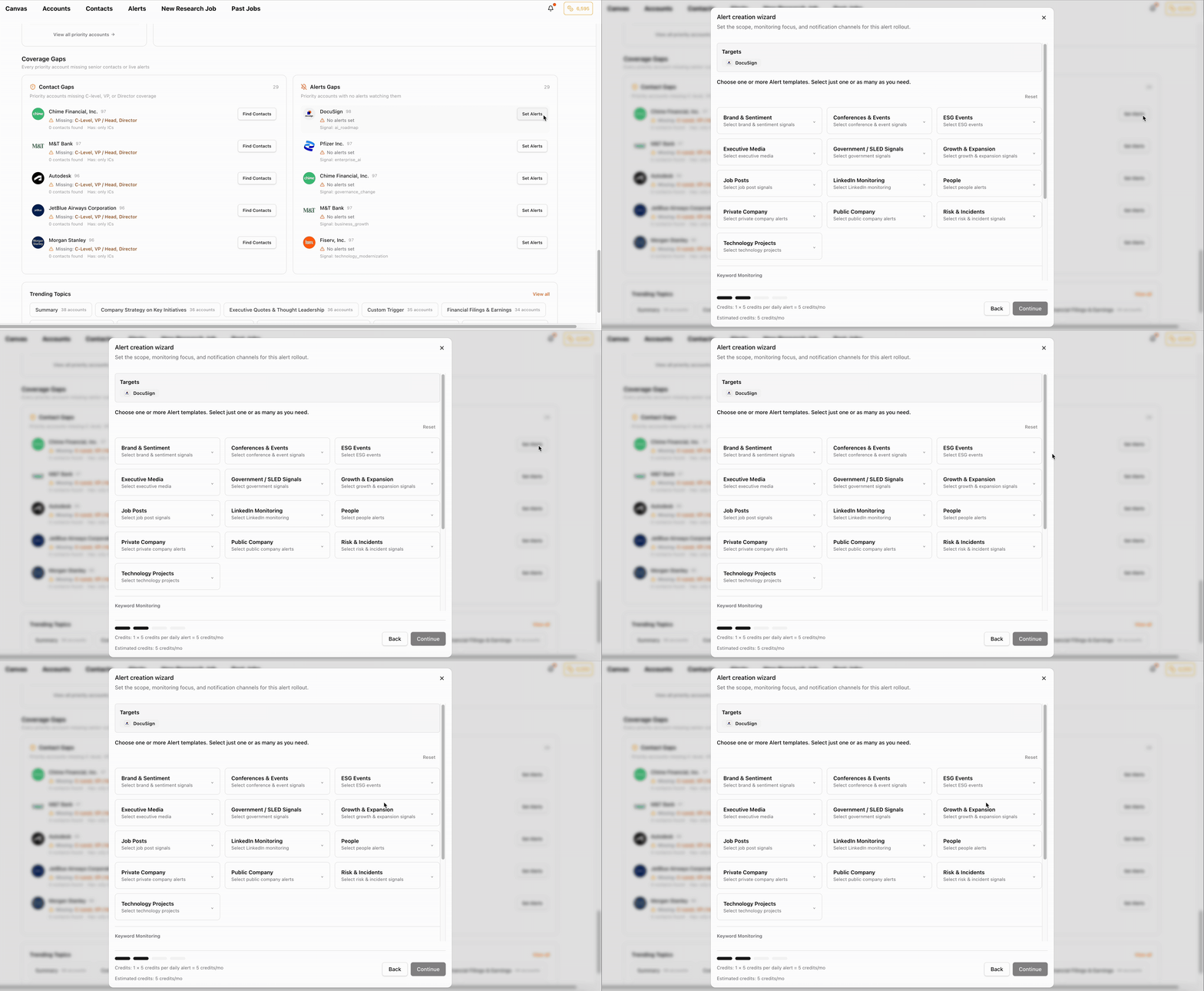
Step 1: Start with your priority accounts only
Don't set alerts on your entire book on day one. Start with 5–10 priority accounts — the ones where timing matters most and where a signal would change what you do this week.
Step 2: Write one query per selling motion
If you sell one thing one way, you need one alert query. If you have multiple selling motions (expansion vs. new logo vs. competitive displacement), write a query for each.
Expansion motion: "New product line, international expansion, major hiring surge, exec sponsor promotion"
Competitive displacement: "Vendor dissatisfaction, competitor incident, contract renewal period, RFP announcement"
New logo / land deal: "Initiative related to your category, new budget for your area, leadership hire in your buying committee, strategic priority that maps to your value prop"
Step 3: Set cadence by signal velocity
- Daily for accounts in active deals or with fast-moving signals (leadership, competitive, breaking events)
- Weekly for accounts on your watchlist or in early-stage pipeline (trends, hiring, strategic content)
- Don't mix cadences on the same account — if an account is active enough for daily monitoring, set it to daily. You can always mute it later.
Step 4: Choose delivery channels by urgency
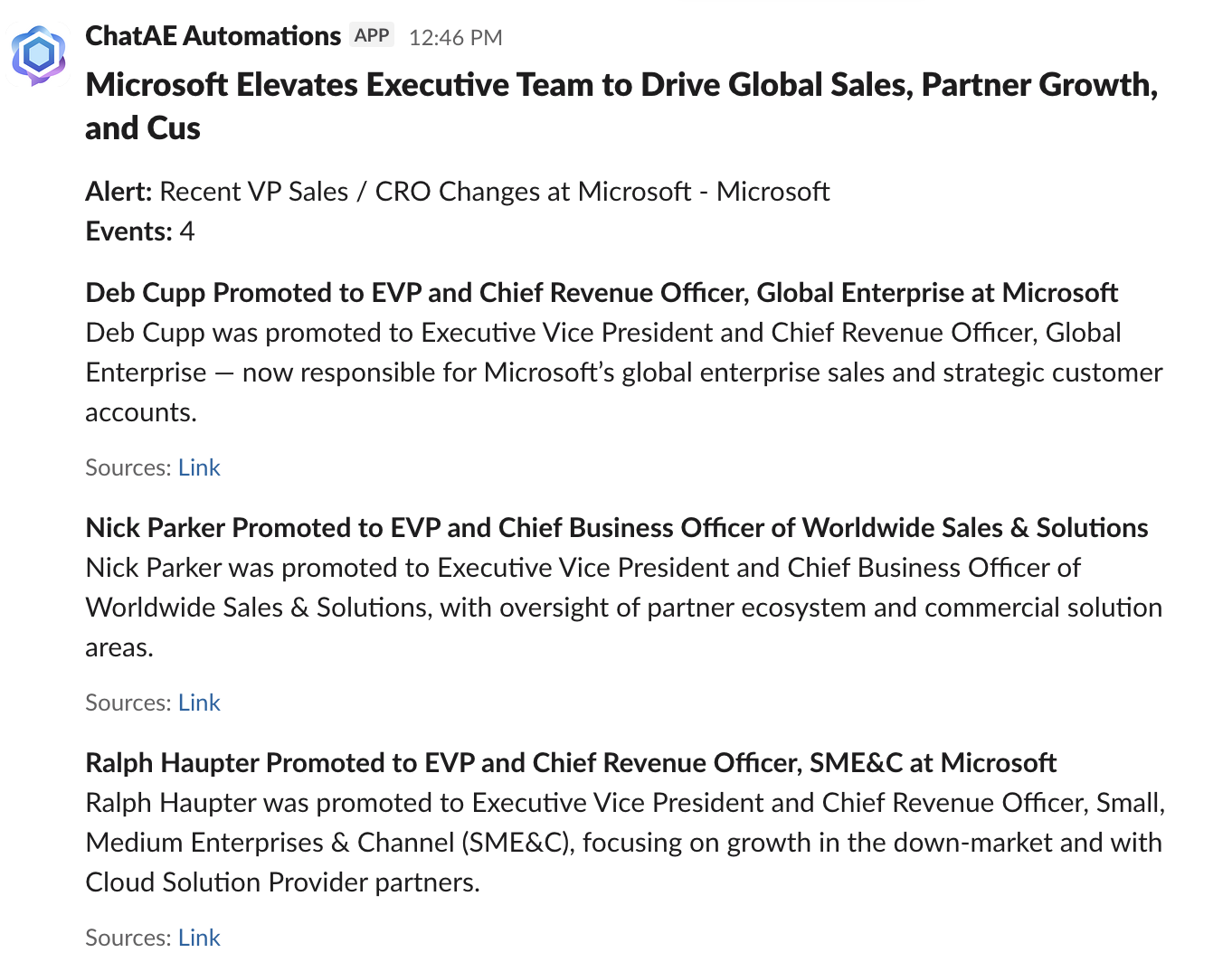
- Slack for time-sensitive signals you need to see immediately (leadership changes, competitive events)
- Email digest for weekly summaries you'll review during planning time
- In-app only for lower-priority accounts you check when you're doing account work
Don't send everything to Slack. If every alert hits the same channel with the same urgency, you'll mute the channel within a week.
Step 5: Review and prune after 2 weeks
After two weeks of alerts, ask yourself:
- Which alerts led to action? Keep those.
- Which alerts did I read but didn't act on? Tighten the query or drop the account.
- Which alerts did I ignore entirely? Delete them.
- Are there accounts with no alerts that should have them? (Check Alerts Gaps in Home Command Center.)
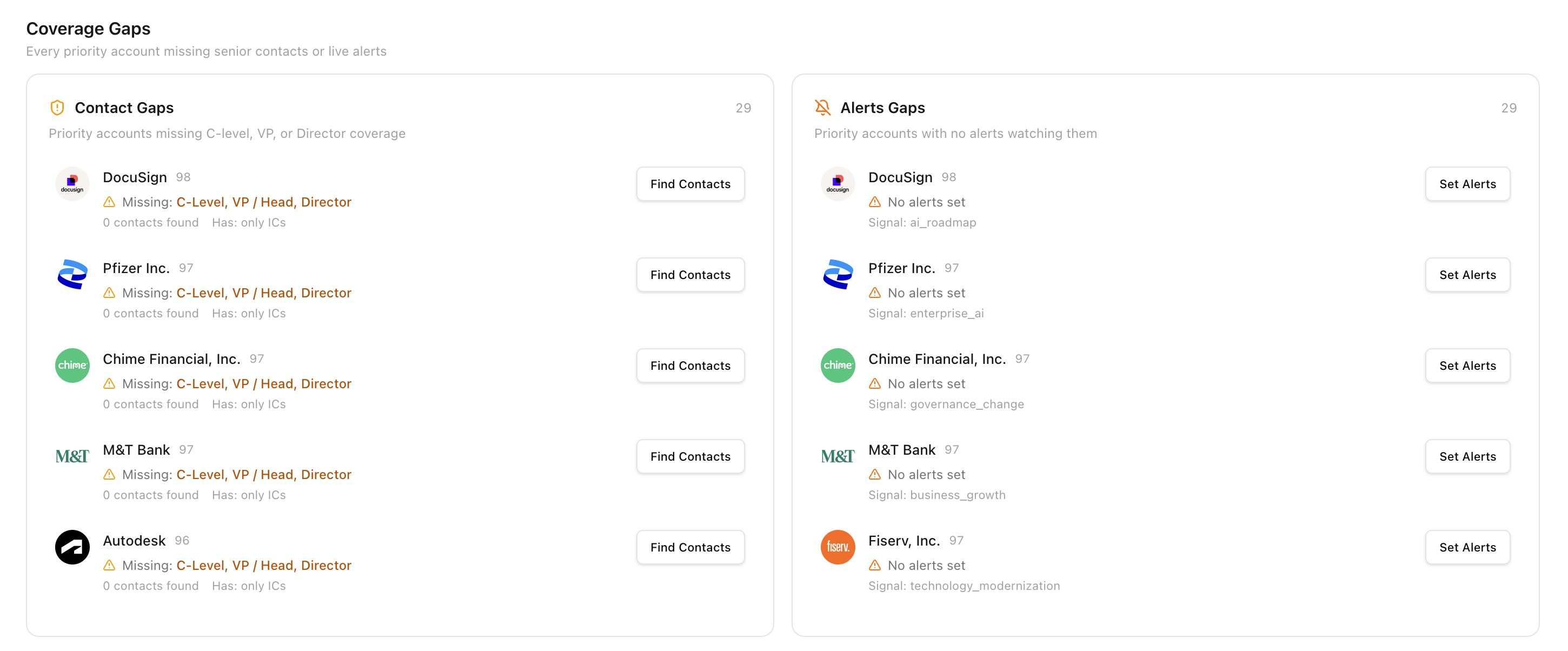
Good alert hygiene means pruning as much as setting. An alert you ignore trains you to ignore all alerts.
Cadence Decision Framework
Use this to decide how frequently to monitor each account:
Daily
- Leadership changes — 2-week window to engage new execs. Example: CTO hire at target account.
- Competitive events — First-mover advantage in evaluations. Example: Competitor outage, public complaint.
- Breaking strategic shifts — Creates immediate internal priority change. Example: Acquisition, layoff, major pivot.
Weekly
- Hiring patterns — Trends matter, individual postings don't. Example: 15 data eng roles over 3 weeks.
- Product/tech investment — Wide selling window, not time-critical. Example: Cloud migration announcement.
- Industry/regulatory — Affects many accounts, not urgent per-account. Example: New compliance requirement.
Event-Based
- Earnings and financials — Published schedule, specific dates known. Example: Q2 earnings call transcript.
- Budget cycles — Annual rhythm, plan around known dates. Example: FY planning begins in October.
- Conferences — Announcements cluster around known dates. Example: re:Invent, Dreamforce, RSA.
The Compound Effect: Alerts + Research + Prioritization
Alerts don't work in isolation. They work as part of the system:
- You set your triggers — the events that create selling opportunities.
- Research runs — ChatAE evaluates your accounts against those triggers.
- Alerts monitor — between research cycles, alerts catch new events.
- Alerts update priority — when an alert fires, the account's signal freshness updates.
- Home Command Center re-ranks — an account with a new alert hit rises in Strongest Signals.
- You act — with context, timing, and a reason to reach out.
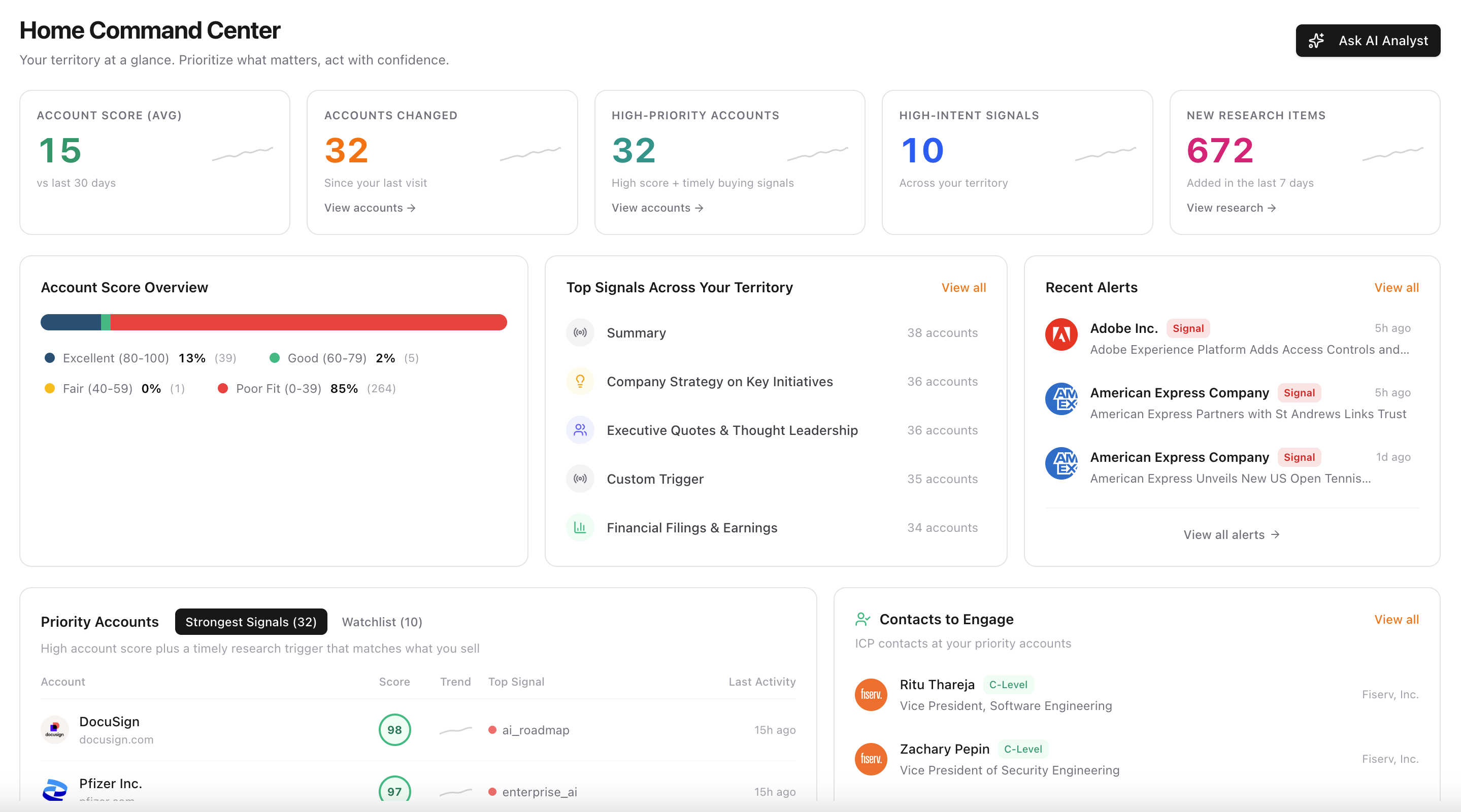
The alert isn't the endpoint. It's the trigger that updates the picture. The system maintains awareness so you can focus on execution.
Common Mistakes and How to Fix Them
Mistake: Setting alerts on every account immediately. Fix: Start with 5–10 priority accounts. Expand as you learn what queries produce action.
Mistake: Queries that are too broad ("news about Company X"). Fix: Write queries as buying events tied to your selling motion, not topic monitoring.
Mistake: Same cadence for everything. Fix: Match cadence to signal velocity. Leadership = daily. Hiring patterns = weekly. Earnings = event-based.
Mistake: All alerts go to the same channel. Fix: Route by urgency. Time-sensitive → Slack. Weekly digest → email. Low-priority → in-app.
Mistake: Never pruning. Fix: Review every 2 weeks. Delete alerts you haven't acted on. Tighten queries that fire too often.
Mistake: Monitoring signals that don't change behavior. Fix: Before setting any alert, answer: "If I saw this, what would I do differently?" If the answer is nothing, don't set it.
Mistake: Using alerts as a replacement for research. Fix: Alerts catch events between research cycles. They don't replace deep research on strategic accounts. Run research first, then set alerts to maintain awareness.
FAQ
How many alerts should I have active at once? Start with 5–10 accounts. Expand only when your current alerts consistently produce action. If you're getting more than 3–5 alerts per day and ignoring most of them, you have too many or your queries are too broad.
What if I sell to multiple personas at the same company? Set one alert per account with a query that covers the events relevant to any of your personas. Don't set separate alerts for the same account — you'll get duplicate noise. Write one comprehensive query: "Engineering leadership change, security initiative, platform investment, budget reallocation."
What if nothing fires for weeks? That's fine. It means nothing happened that creates a selling opportunity. Silence is signal too — the account is stable. Check on it through research when you're doing account planning, but don't lower your alert threshold just to see activity. An alert that fires on nothing meaningful is worse than one that stays quiet.
Should I set alerts on prospects I haven't contacted yet? Only if they're in your target account list and you're waiting for a reason to reach out. An alert on a cold account gives you the timing signal for first outreach. But don't monitor hundreds of accounts you haven't qualified — that's research work, not alert work.
What's the difference between alerts and research triggers? Research triggers define what kinds of events matter to your selling motion. They're used when ChatAE runs research on an account. Alerts use those same categories to monitor accounts between research cycles. Think of triggers as your definition of "what matters" and alerts as the system watching for it in real time.
Can I change cadence later? Yes. As accounts move through your pipeline, their cadence should change. Early-stage accounts might be weekly. Accounts in active negotiation should be daily. Closed-won accounts might move to weekly or be removed entirely (or handed to CS with their own alerts).
The One-Line Test
Before you set any alert, finish this sentence:
"If I see this alert fire, I will ___________."
If you can't finish the sentence with a specific action — a call, an email, a competitive play, an internal escalation — don't set the alert. Your future self will thank you for keeping the signal clean.